Why is a resource pool not synchronized?
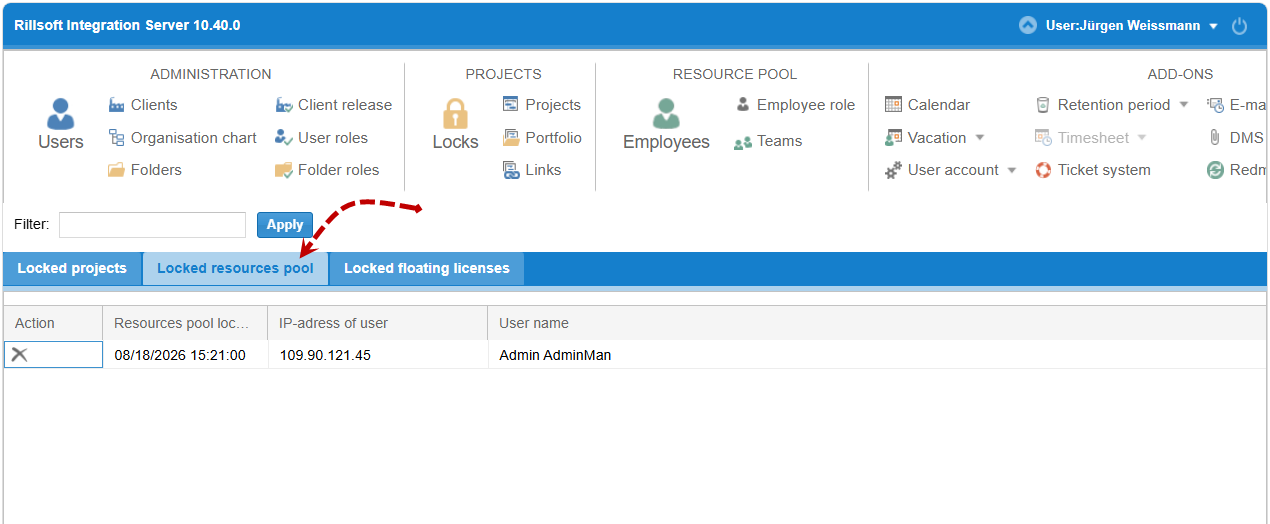
Most often the resource pool is locked for editing by another user, or the user has no client sharing for the affected client. First check under Locks > Locked resource pools whether the pool is currently open by someone else.
Symptom
Changes to the resource pool (e.g. new employees, changed roles) do not appear as expected in Rillsoft Project, or the resource pool cannot be opened/edited.
Possible causes
The resource pool is locked for editing by another user.
The user has no client sharing for the client whose resource pool is to be edited.
An older resource pool version is displayed instead of the current one.
Check steps
Go to Locks > Locked resource pools and check whether the resource pool is currently locked, see Lock.
Go to Administration > Users and check the affected user’s client sharing, see Define a user’s client access.
Go to Administration > Clients and use the resource pool icon to check the existing resource pool versions, see Resource pool versions of a client.
Action
Resource pool locked: With the appropriate access rights, remove the lock under Locks > Locked resource pools, see Lock.
Missing client sharing: Grant the user client sharing, see Define a user’s client access.
Wrong/old version: Restore the desired resource pool version, see Resource pool versions of a client.
Note
The actual opening/connecting of the resource pool in the client happens in Rillsoft Project itself and is described there, see Connect the resource pool to Rillsoft Project.
Related topics
resource pool locked, resource pool synchronization, resource pool not updating, resource pool, personnel, employees, teams, roles, resource-manager, it-administration