Administration
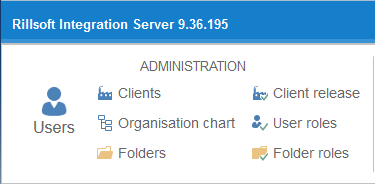
Under this menu item you find all commands for managing users, clients, roles, and folder structures.
Users
A list of users is shown. Users are people who are allowed to work with Rillsoft Project via the interface to Rillsoft Integration Server. In Rillsoft Integration Server, users can be independent of clients.
Clients
As a rule, one resource pool is created for a single client. Accordingly, you should work with only one resource pool per client. If you want to draw resources from several resource pools, create several clients accordingly.
Client release
This function lets you control whether a user is allowed to work with a client at all. If client release has not been granted to a user, they see no information about that client, as if it did not exist.
Organization chart
The user organization chart shows the hierarchical structure for the following areas:
Administration
Timesheet
Vacation planning
User roles
User roles define access rights for:
User management
Working with the portfolio
Working with the resource pool
Vacation planning
Working with DMS
Working with iCalendar
Working with Timeline
Folders
Folders map the project landscape per client. They are virtual structures that can be organized by any criteria.
Folder roles
Folder roles are folder-dependent and are responsible for the access rights to the following activities:
Working with folders
Working with projects
E-mail notification
Timesheet
iCalendar access